SQL Joins Explained: INNER, LEFT, RIGHT, CROSS (and the Comma Join)
Published: 2026-02-04
SQL joins let you combine rows from two tables based on related columns. This short tutorial shows the four core join types and explains why the comma join is the same as a CROSS JOIN.
Sample Data
We use two tables in all examples:
employees table:
| id | name | dept_id |
|---|---|---|
| 1 | Ava | 10 |
| 2 | Ben | 20 |
| 3 | Cara | NULL |
departments table:
| dept_id | dept_name |
|---|---|
| 10 | Sales |
| 20 | Engineering |
| 30 | Support |
Try the joins in your browser
You can run the example queries directly in the page. Edit the query and click Run.
INNER JOIN
Returns only rows that match in both tables.
Result: Ava/Sales, Ben/Engineering. Cara is excluded because she has no matching department, and Support is excluded because there is no employee in dept 30.
LEFT JOIN (LEFT OUTER JOIN)
Returns all rows from the left table, plus matching rows from the right table. Non‑matching right side becomes NULL.
Result: Ava/Sales, Ben/Engineering, Cara/NULL. All employees are kept.
RIGHT JOIN (RIGHT OUTER JOIN)
Returns all rows from the right table, plus matching rows from the left table. Non‑matching left side becomes NULL.
Result: Ava/Sales, Ben/Engineering, NULL/Support. All departments are kept.
Note: Many developers prefer rewriting
RIGHT JOINasLEFT JOINby swapping table order for readability and consistency.
CROSS JOIN
Returns the Cartesian product (all combinations) of the two tables.
Result: 3 × 3 = 9 rows (every employee paired with every department).
Comma Join (Legacy Syntax)
The comma join is the same as a CROSS JOIN. It lists tables separated by commas in the FROM clause:
This produces the same Cartesian product as CROSS JOIN. If you add a filter in the WHERE clause, it behaves like an INNER JOIN:
While still valid, the comma syntax is considered outdated because it mixes join logic with filters and can be harder to read. Prefer explicit JOIN ... ON syntax.
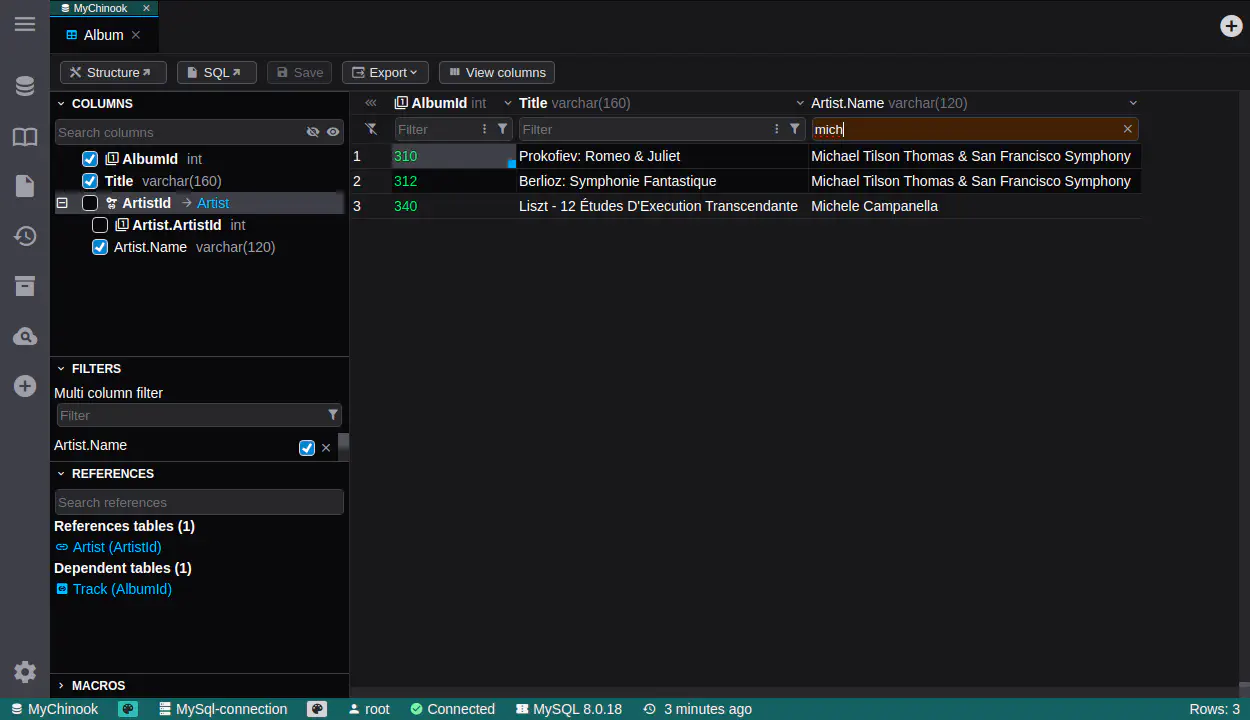
DbGate: Automatic LEFT JOINs when expanding columns
In DbGate’s data browser, expanding a foreign‑key column automatically generates a query with a LEFT JOIN to pull in related data without dropping rows from the main table. This keeps your base dataset intact while making related fields available immediately.
Summary
INNER JOINkeeps only matching rows.LEFT JOINkeeps all rows from the left table.RIGHT JOINkeeps all rows from the right table.CROSS JOINreturns all combinations.- Comma join is the same as
CROSS JOIN(and with aWHEREfilter it becomes anINNER JOIN).