dbgate-pg-dumper: PostgreSQL Backups Without pg_dump
Published: 2026-08-07 | Stela Augustínová
Creating a PostgreSQL backup usually requires the pg_dump command-line tool. It must be installed separately, available on the system path, and compatible with the PostgreSQL server. This can make backup setup more difficult, especially in desktop applications and Docker containers.
We created dbgate-pg-dumper to make this easier. It is a PostgreSQL backup and restore engine written in TypeScript that runs directly inside DbGate or another Node.js application. No external pg_dump or psql process is required.
View dbgate-pg-dumper on npm →
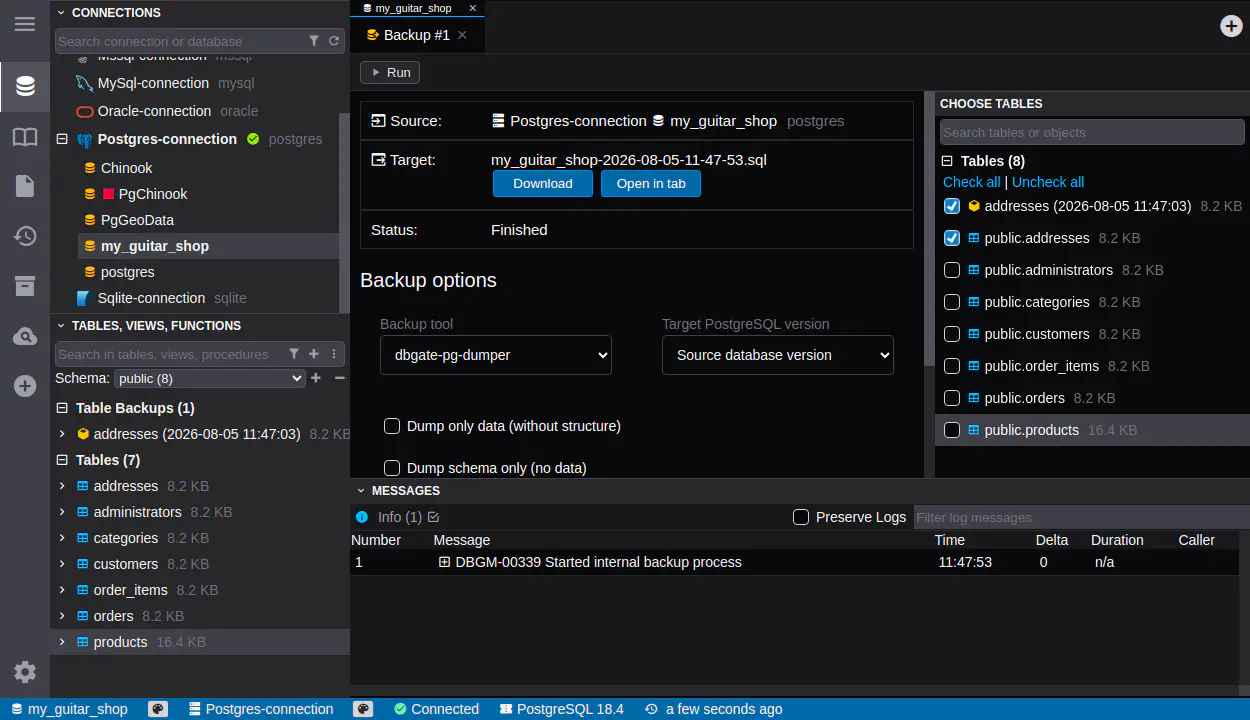
PostgreSQL Backup Built Into DbGate
DbGate Community uses dbgate-pg-dumper as its built-in PostgreSQL backup and restore option. You can create a plain-SQL backup from the DbGate interface without installing additional PostgreSQL tools.
The dumper includes both the database schema and table data. It understands common PostgreSQL objects such as tables, columns, indexes, constraints, sequences, views, functions, triggers, extensions, comments, ownership, and permissions.
DbGate Premium adds more control, including the ability to select individual tables and choose the target PostgreSQL version.
Designed for Large Databases
The dumper does not load the complete database into memory. Table rows are read and written gradually, so the same process can handle both small databases and tables containing large amounts of data.
The default output uses PostgreSQL’s efficient COPY format. INSERT and column-aware INSERT statements are also available when a more readable or portable SQL file is preferred.
During the backup, DbGate can display the current phase, processed tables, row counts, warnings, and errors. The operation can also be cancelled safely.
Consistent and Compatible Backups
By default, a complete backup uses a single physical PostgreSQL connection and reads the schema and table data within one read-only, repeatable-read transaction. This provides a consistent MVCC snapshot, preventing schema and table data from being observed at different moments while the database is changing. This guarantee does not apply when transactions are disabled; when using an existing transaction, its isolation level is controlled by the caller.
When a target PostgreSQL version is selected, the dumper checks whether the exported features are supported by that version. If something is not compatible, it reports a clear warning or stops the operation according to the selected settings. This is useful when moving a database between different PostgreSQL versions.
Plain-SQL Restore
dbgate-pg-dumper can restore the SQL files it creates. It can also read compatible plain-SQL output produced by pg_dump --format=plain.
The restore runs progressively and reports completed operations and restored rows. It correctly handles PostgreSQL function bodies, comments, quoted identifiers, and COPY ... FROM STDIN data blocks.
The current restore workflow focuses on UTF-8 plain-SQL files. PostgreSQL custom, tar, and directory archive formats are not supported by this reader.
Also Available as an npm Package
Although it was built for DbGate, the dumper is independent of the rest of the application. Node.js developers can install the public dbgate-pg-dumper package and use its backup and restore API in their own projects.
The package also works with hosted PostgreSQL databases. For example, you can use dbgate-pg-dumper directly in a Node.js application to create a Neon database backup, saving its schema and data as a local plain-SQL file without installing pg_dump.
Version 1.0.0 supports ES modules and CommonJS and requires Node.js 20 or newer. An adapter for the popular pg driver is included, while the core API can also be connected to another PostgreSQL client.
With dbgate-pg-dumper, PostgreSQL backups become easier to run across desktop, server, and Docker environments while remaining available as ordinary, portable SQL files.