DbGate Lite
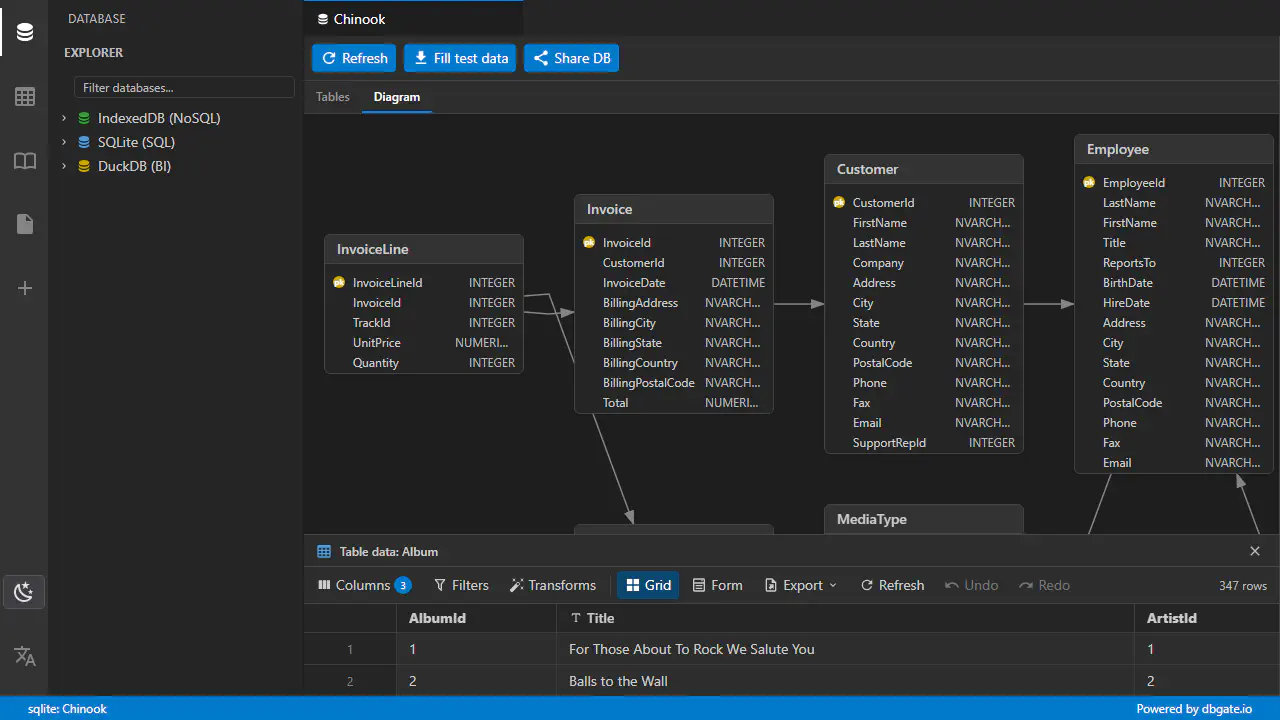
A free, in-browser tool built on the same technology as DbGate Central - ideal for learning SQL, sharing queries and sample databases, and quick ad-hoc work with data files.
DbGate Lite is our free, in-browser tool, built on the same technology as DbGate Central - so the grid, filtering, editing and querying feel exactly the same. It is designed for two things: learning SQL and quick, ad-hoc work with data files.
Learn and teach SQL
DbGate Lite runs SQLite and DuckDB entirely in your browser (via WebAssembly) - nothing to install, no login. That makes it perfect for learning and teaching:
- Write and run real SQL queries against a sample database in the familiar DbGate grid.
- Share a query and a sample database with a single link - the link can carry the database definition and the query to open, so the recipient gets exactly the same starting point in one click.
- Visualize how tables relate with ER diagrams.
Ad-hoc work with data files
Need to poke at a file quickly? Open it in DbGate Lite and treat it like a database:
- Import CSV, JSON and Excel files and query or edit them with SQL.
- Clean and reshape data, then export the result back to CSV, JSON or Excel.
- Publish a read-only view of a CSV/JSON file or a report by sharing a link.
When to choose Lite, Central, Premium or Team
DbGate Lite is great for learning and one-off tasks. For ongoing, professional work, a dedicated edition is the better fit:
- DbGate Lite - free, in-browser. Best for learning SQL and ad-hoc data files.
- DbGate Central - hosted edition for working with APIs: connect to live GraphQL, oData and Shopify endpoints, keep connections and reports in a workspace, and share them with your team.
- DbGate Premium - the full desktop application for working with databases: connect to SQL and NoSQL servers with the complete set of professional tools.
- DbGate Team Premium - for teams: a shared web interface that runs on-premise, so your whole team works with databases from the browser on your own infrastructure.